Aqara S1 Plus
A133 wall panel, rooted. The reference frame. Every pane runs on it, including the Zigbee/Thread radio and the wall base.










On this page
A Glassworks frame: the device definition for the Aqara S1 Plus. Its data is in design/frame.json (format: frames/README.md), and glassworks.dev/frames/aqara-s1-plus shows it.
Install · Features · Status · Radio · Updates · Known issues · Undo & safety · FAQ
Latest release · What's new · How we got here
Credits
Kiln's install stands on two open-source projects. Thank you.
- FEL tooling: sunxi-tools, by linux-sunxi (GPL-2.0). The FEL protocol reference that the recovery-mode step follows to start U-Boot from RAM (fel.md, web-installer.md).
- Root: Magisk, by topjohnwu (GPL-3.0). The root that the boot patch adds. Kiln downloads it from Magisk's own release and checks its hash; Glassworks never ships it.
U-Boot, Trusted Firmware-A and the other code we ship are in
THIRD-PARTY-NOTICES.md. The list above is in
design/frame.json (credits; how).
Why
The S1 Plus is good wall hardware: a 1440×720 touchscreen, a microphone and a speaker, a time-of-flight presence sensor, an ambient light sensor, a Zigbee/Thread radio and a mains relay base. Out of the box it only runs Aqara's launcher and talks to Aqara's cloud. Its system WebView is Chromium 74, which is too old for the current Home Assistant frontend.
Glassworks replaces the software layer and leaves the hardware alone. The panel boots into S1 Kiosk, a small open-source app built on GeckoView (Firefox's engine). It shows your dashboard and appears in Home Assistant as a single ESPHome device. You don't need an Aqara account, soldering, or a terminal.
What you get
Your dashboard, full screen. A current Home Assistant frontend in a kiosk that is the panel's home screen. HA's header and sidebar are hidden. You sign in by scanning a QR code with your phone, so you never type a password on the wall. You pick which dashboard it shows in HA.
A voice assistant. On-device wake word (microWakeWord), Assist pipelines, timers and announcements, with a calm full-screen overlay while you talk.
| 🏠 One ESPHome device | HA discovers the panel and sets up encryption automatically. You get the screen as a light, presence, light level, a speaker, voice settings and the wall base, plus the dashboard and radio controls. The entities |
| 🎵 Music Assistant player | A native Sendspin player that plays in sync with your other speakers. Sendspin guide |
| 🔔 Notifications | HA sends a notification and the panel shows it over the dashboard, with a camera's picture, buttons and a sound. It can also open a dashboard view full screen, like a doorbell's. Notifications guide |
| 👋 Wakes when you walk up | The screen wakes as you approach, turns off when the room is empty, and dims at night. It is driven by the panel's own sensors. Sensors guide |
| 📡 Radio for Home Assistant | The panel's Zigbee/Thread radio can be a Zigbee coordinator for ZHA or (experimental) Zigbee2MQTT, a Thread border router, or a repeater in your existing network. You switch roles from HA. How to |
| 🔄 Updates in Home Assistant | New versions show up under Settings → Updates, and one click installs them. Fixes for the radio side come with them. Updates |
| 🔌 Wall base relays | A driver for the mains relay base that speaks its UART protocol directly, with no Aqara daemon. Not yet tried on a real base. Wall bases |
| 🔒 No Aqara cloud | Aqara's launcher, apps, updater and cloud daemon are switched off (reversibly), so the panel stops talking to Aqara. |
| ✨ Its own boot screen | The Glassworks splash and boot animation: glass plates drop into place and the top one lights up. Boot branding |
Status
Status: beta.
Clarity v2: D, a good wall panel for light dashboards (measured 2026-11-15 UTC, 3 of 3 runs, not provisional). Typical dashboards hold it back: without a camera their view is drawn in 1.2 s, but the main thread then stays blocked for 2.9 s. The report is in clarity/report.md, and the summary the site grades in clarity/clarity.json (how Clarity grades). The Clarity badge shows the grade once glassworks.dev publishes it.
What works on main, as of 2026-11-14. The latest release is v0.4.3, and rows marked New come with
the next one. "Verified" means tested on a real panel in a real home.
| Feature | Status |
|---|---|
| Kiosk, HA dashboard, QR sign-in, dashboard picker | ✅ Works |
| ESPHome device with automatic encryption | ✅ Works |
| Voice assistant with on-device wake word, timers, announcements | ✅ Works · far-field tuning ongoing |
| Music Assistant player (Sendspin, synced) | ✅ Works |
| Notifications from HA: cards, pictures, buttons, sounds, a view full screen (how) | 🧪 New · first run on the S1 2026-11-14 (cards, pictures, buttons, Do not disturb, a view full screen); the critical alert's rerun pending |
| Presence wake, idle-off, night mode, auto-brightness | ✅ Works |
| Aqara cloud and bloat disabled (reversible) | ✅ Works |
| Boot splash and animation | 🧪 The Glassworks redraw has not yet run on a panel. The Glass Tile one before it works |
| Web installer, command-line installer, undo | ✅ Verified end to end (firmware 4.5.80) with the old S1 installer; boot patch tested on two firmware versions. Kiln has not yet done a full install on a panel |
Manage page in the browser (:8099, sign in through Home Assistant): status, log, diagnostics, signed-in browsers (guide) |
🧪 New · not yet checked on a panel; settings are read-only for now |
| Panel health in Home Assistant: CPU, temperature, RAM, storage, Wi-Fi, uptime (entities) | 🧪 New · not yet checked on a panel |
| Bluetooth proxy for Home Assistant, listening only (details) | 🧪 New · its engine met the S1 (HA found it, no Wi-Fi cost, 2026-11-14); the pane itself not yet |
| App updates from Home Assistant | ✅ Works from v0.4.1 on (one manual update first on older versions) |
| Time zone kept across reboots | ✅ Works (needs the boot software from v0.4.0) |
| Radio: Zigbee coordinator for ZHA | ✅ Verified · keep the radio's network settings (known issue) |
| Radio: Zigbee coordinator for Zigbee2MQTT | 🧪 Experimental · ember adapter: forming a network, resuming it and opening joining verified; not yet used for long with real devices |
| Radio: Thread border router | ✅ Works · as your only border router (a Matter bulb added with the HA app and controlled from HA) or next to an existing one, also after a Wi-Fi drop and a restart. Must be on HA's network |
| Radio: Zigbee router (repeater), Thread router (repeater) | 🧪 Experimental · both joined a real home network as a repeater |
| Radio: only Home Assistant can connect | ✅ Verified |
| Radio firmware updates | 🧪 Experimental · re-flashing Aqara's original firmware verified; no other firmware offered yet |
| Wall base relays | 🧪 Driver done and checked against Aqara's own tool, but not yet tried on a real base |
| Wi-Fi setup over Bluetooth (Improv) | 🧪 Implemented; lightly tested |
| A short entity list in HA: settings and troubleshooting entities start turned off (list) | 🧪 New · the check on a panel HA already has is pending |
Hardware
| SoC | Allwinner A133 |
| Size | 172 × 86 mm; 42 mm deep with the in-wall box |
| Screen | 1440 × 720 |
| Radio | EFR32MG21 on SPI, RCP firmware |
| Presence | VI5300 time-of-flight sensor |
| Audio | Microphone and speaker |
| Extras | Wired wall base on a UART |
| Root | FEL, then a patched boot image |
Supported hardware
| Device | Status |
|---|---|
| Aqara Panel Hub S1 Plus, MP-K03D (wall-mounted; EU, UK, AU and other regions) | ✅ Tested on firmware 4.5.80 |
| S1 Plus for China, JYMKP01LM (86-box) | ❓ Untested. The installer refuses it if the layout doesn't match. |
| S1 Plus Desktop, MP-K05D | ❓ Untested |
| Other Aqara panels and hubs | ❌ Not supported |
Inside: Allwinner A133 (quad Cortex-A53), 2 GiB DDR4, 8 GB eMMC, Android 10, a 1440×720 screen, a Silicon Labs EFR32 802.15.4 radio, a VI5300 time-of-flight sensor and an ambient light sensor.
Install
In the browser, over USB. It backs the panel up first, then roots and flashes it.
Install it from Kiln: kiln.glassworks.dev/aqara-s1-plus. The steps are in docs/install.md, and Kiln's recipe for it is in installer/.
Without root, the app can install over adb on its own, but you lose the radio modes.
What you need
- An Aqara Panel Hub S1 Plus (supported hardware).
- A USB-C data cable and a small screwdriver to open the back cover once.
- Chrome or Edge on Windows, macOS or Linux. The installer uses WebUSB, which Firefox and Safari don't support.
- Home Assistant on the same network (2026.11 or newer recommended).
- About 10 minutes.
The web installer (recommended)
Open Kiln at kiln.glassworks.dev/aqara-s1-plus →
Kiln runs entirely in your browser and uploads nothing. It walks you through five steps:
- Panel. Pick the Aqara S1 Plus.
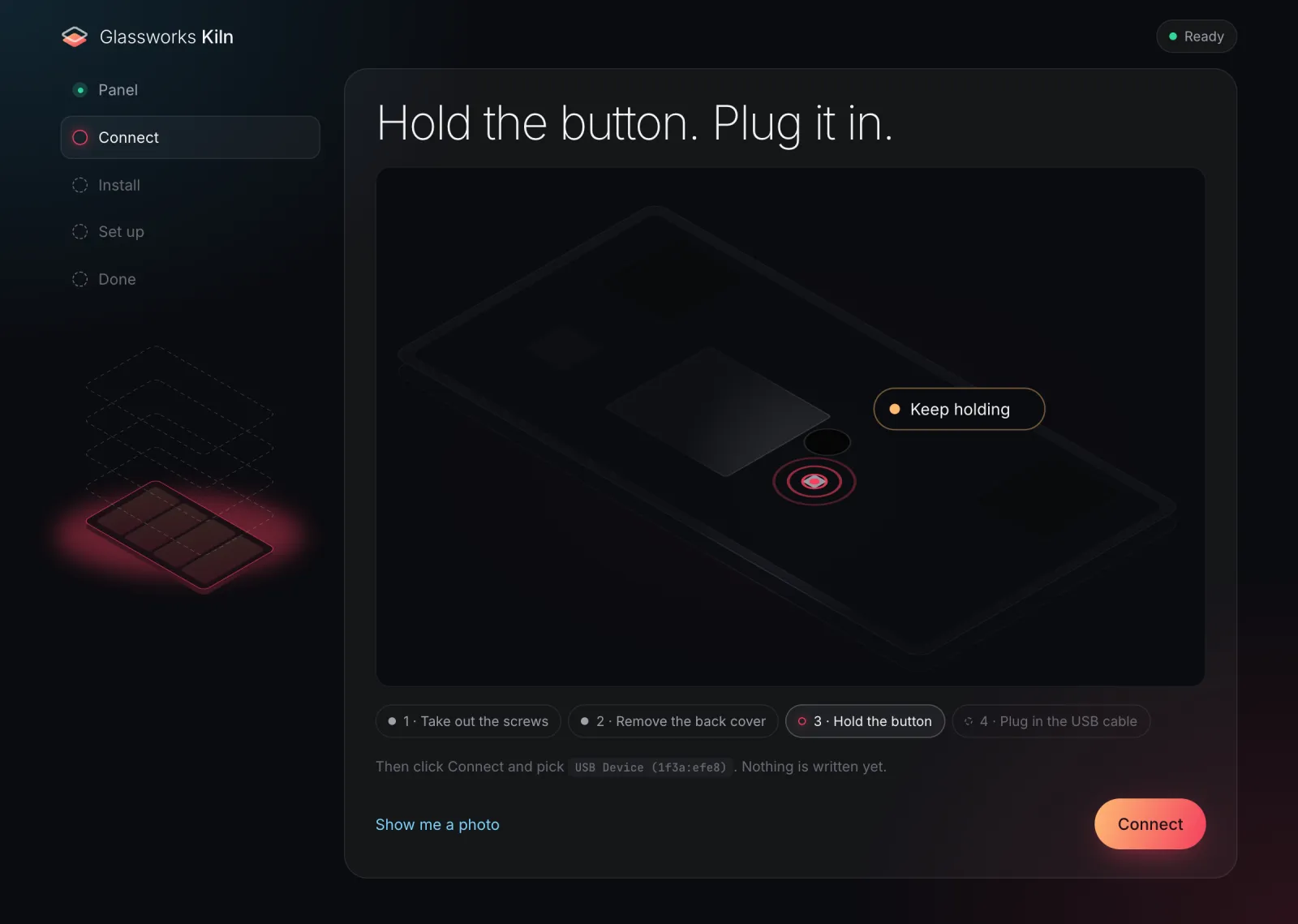
- Connect. With the back cover off, hold the small button on the board while you plug in USB-C. That's recovery mode (FEL), built into the chip. Windows needs a Zadig driver once, and Linux a udev rule; macOS needs nothing.
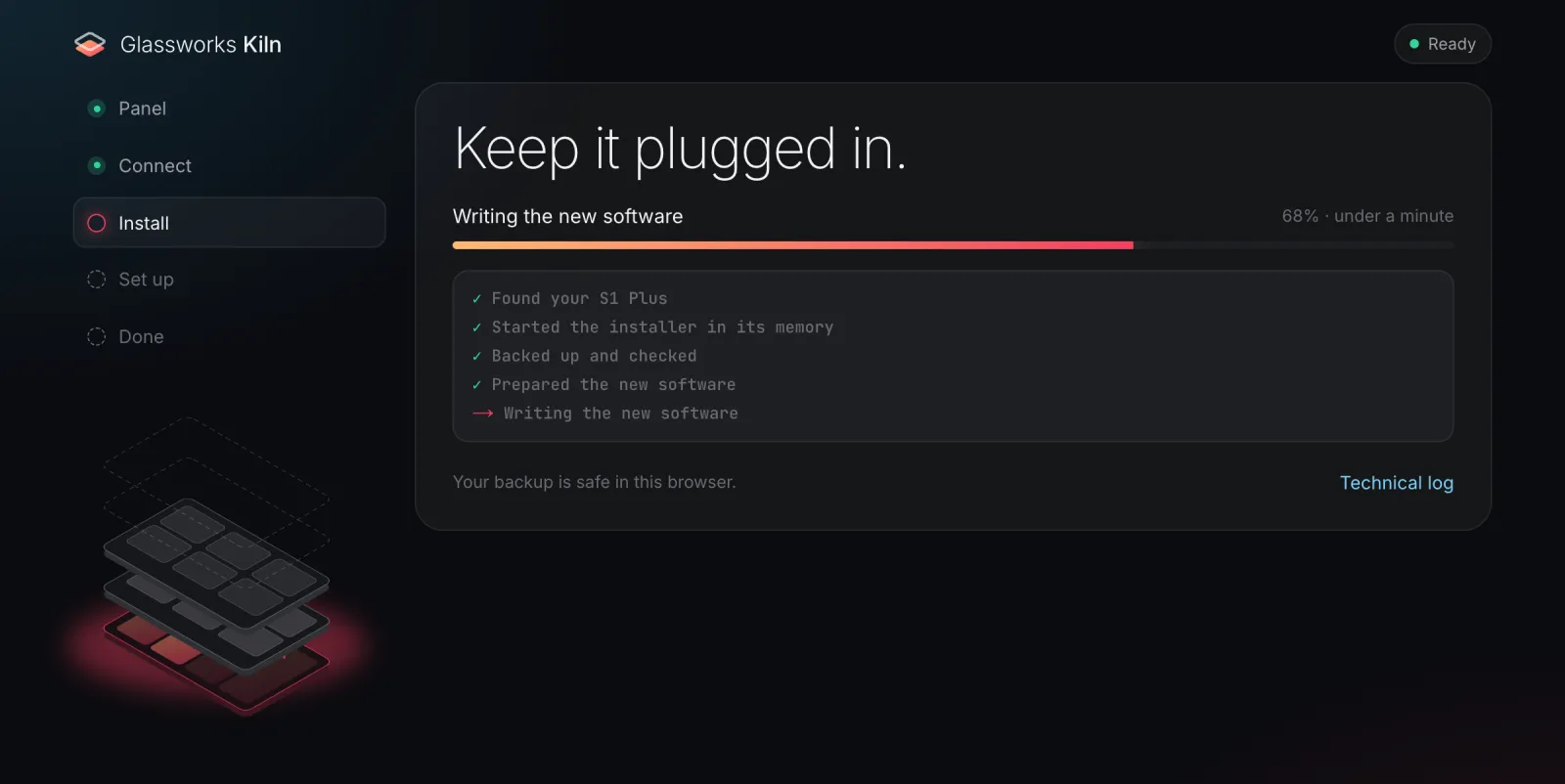
- Install. Kiln starts its own bootloader in RAM, then backs up the panel's partitions in the
browser. Only after that does it patch
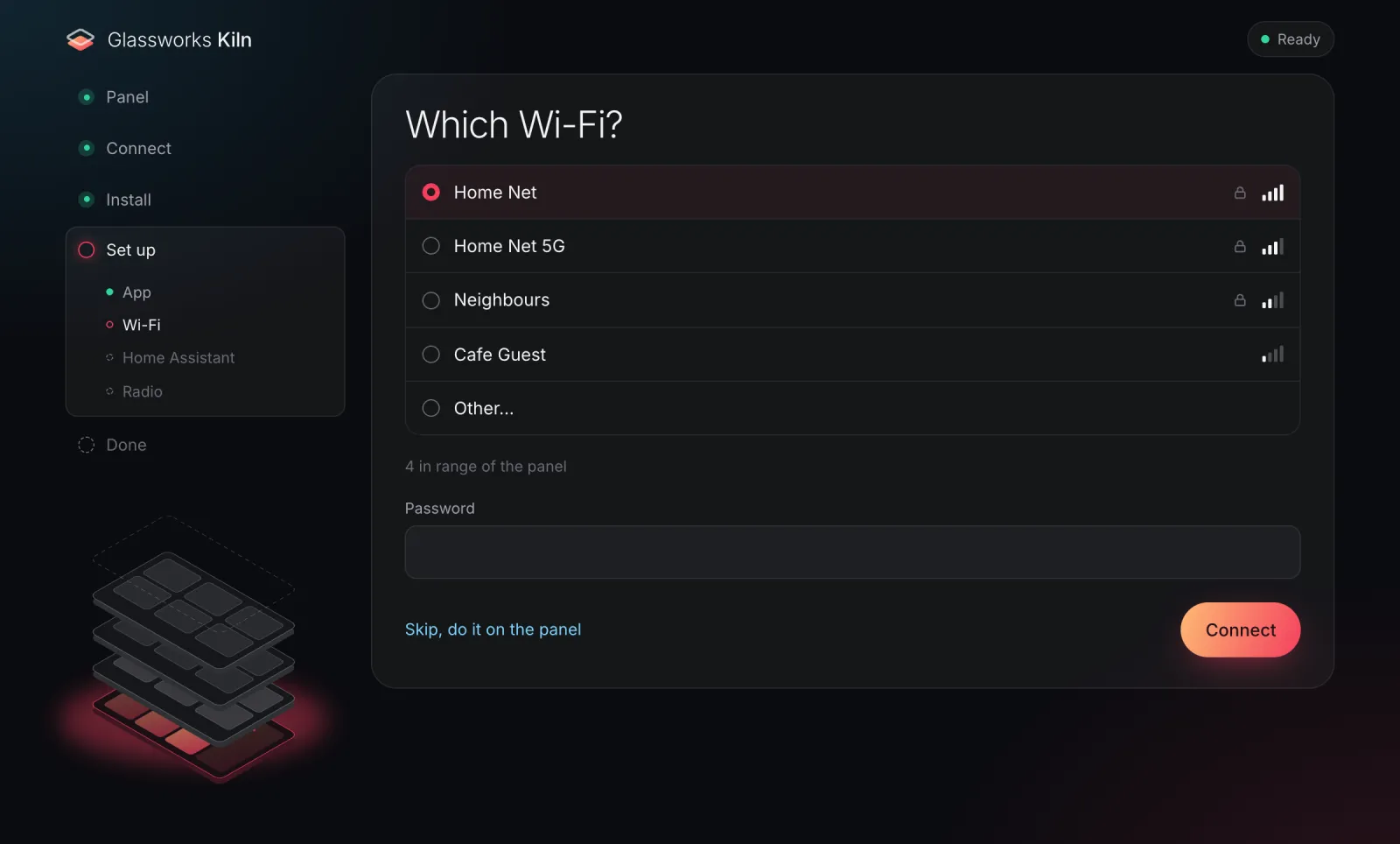
boot(Magisk plus the S1 helper), flash it and read it back to verify. - Set up. S1 Kiosk is installed as the home screen, with your language, time zone and clock. From the same page you set the panel's Wi-Fi (sent over USB), sign it in to Home Assistant, and choose the radio role.
- Done. Download the backup and keep it. Home Assistant finds the panel as an ESPHome device. Click Add.
 |
 |
 |
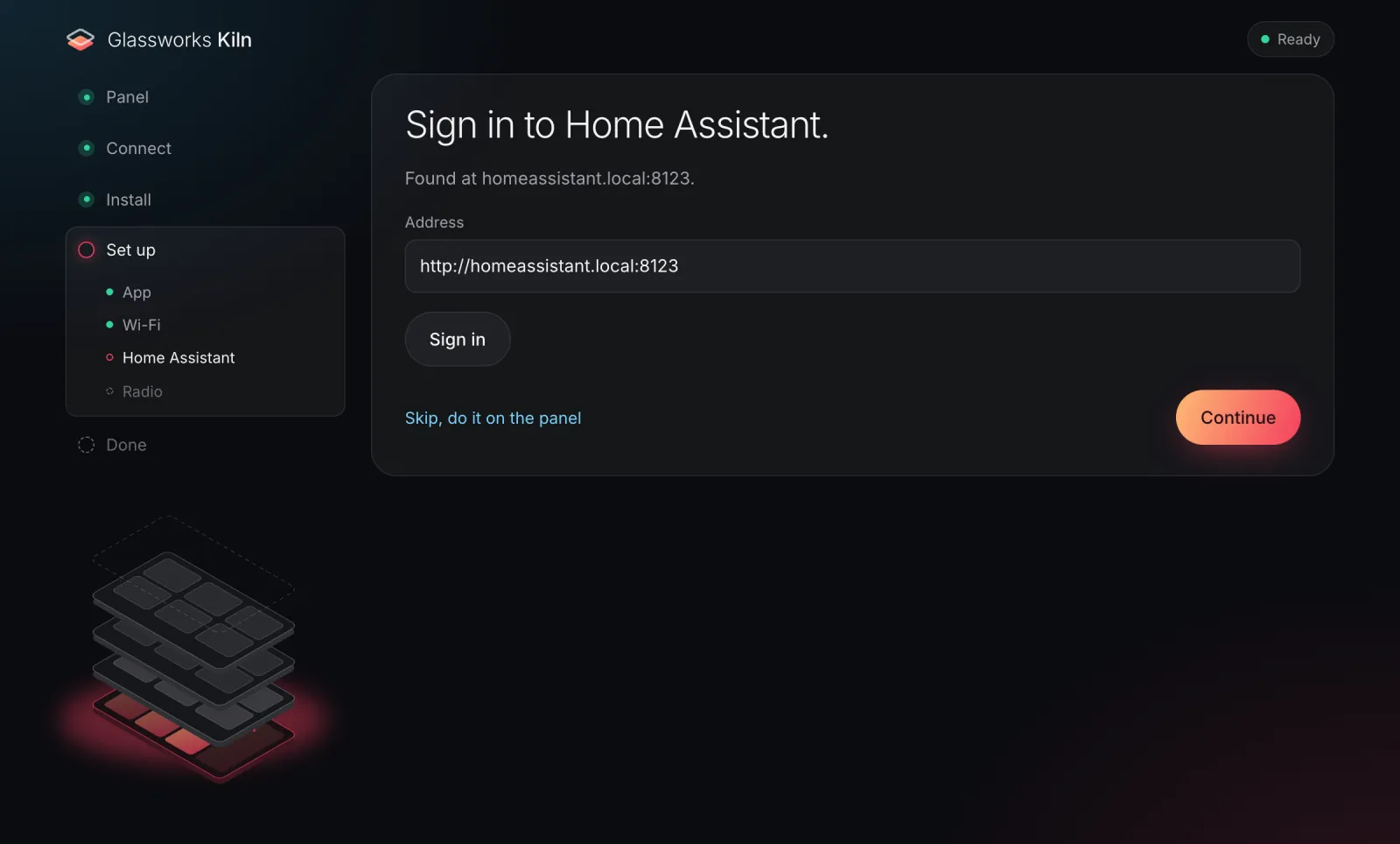 |
Every screen, per-OS setup, what to do when something fails, undo, updating and troubleshooting are in docs/install.md.
Note
The web installer has been tested end to end on a real S1 Plus (firmware 4.5.80), from FEL mode through the backup, the install and the app setup, with the old S1 installer, which runs the same recipe as Kiln. Kiln itself has not yet done a full install on a real panel. The boot patch has been tested on two firmware versions: 4.5.80 and the December 2025 firmware the panel shipped with. So far that is a small number of panels. If anything looks wrong, stop and open an issue. Your backup is safe.
The command line
The same steps as shell scripts, for people who would rather run them by hand (macOS or Linux;
needs sunxi-fel, fastboot, adb, Docker and a U-Boot build):
frames/aqara-s1-plus/tools/install/fel-install.sh ~/s1-backup          # FEL → back up → patch → flash → verify
frames/aqara-s1-plus/tools/install.sh --url http://homeassistant.local:8123 \
    --timezone America/Los_Angeles --locale en-US # install and configure S1 Kiosk over adb
See docs/install.md for the details.
The radio
The S1 Plus has a Silicon Labs Zigbee/Thread radio inside. Glassworks can give it to Home Assistant in one role at a time. You pick the role with Radio mode on the panel's device page in Home Assistant (turn it on there first: HA adds it turned off), or in the panel's own settings menu (Radio), which also shows what to do next, with QR codes for your phone:
- Zigbee coordinator for ZHA: radio type EZSP, serial path
socket://<panel IP>:6638. - Zigbee coordinator for Zigbee2MQTT (experimental): set Zigbee stack to Silicon Labs
8.2.2 first, then use
adapter: emberandport: tcp://<panel IP>:6638. The panel downloads that stack from Silicon Labs itself. - Thread border router: runs its own Thread network, for HA's OpenThread Border Router integration.
- Zigbee router (repeater) or Thread router (repeater) (experimental): joins the network you already have and extends it.
Only Home Assistant can connect to the radio unless you allow other computers. The step-by-step guide is docs/radio-guide.md; the technical reference is docs/radio.md.
Updates
New releases appear in Home Assistant under Settings → Updates (the panel's App update entity). Press Install and the panel installs it by itself; nothing to confirm on the panel. Each update is checked against its checksum and the project's signing key first.
- Panels on v0.4.0 or older need one manual update. Their update installs from Home Assistant
always failed with "the APK is not signed". Open the installer, choose Already installed? Finish
setting it up, and follow it (or run
adb install -rwith the new APK). From v0.4.1 on, updates from Home Assistant work. - The radio side updates with the app (from v0.4.0), once the panel has the matching boot software. Home Assistant's Radio helper sensor says when it needs that. To get it, run the web installer's full install once more (one press of the FEL button). Panels that skip it keep working as before.
- Moving from a development build to a release (panels set up with the command line) needs a one-time reinstall, because the two are signed with different keys. The installers do it for you and keep the panel on its Wi-Fi. Without root over adb, which is the normal case, the app's settings are reset: you sign in again and may need to add the panel to Home Assistant again. See docs/install.md.
Known issues
- ZHA can't create a new network or restore a backup onto the panel yet. It hangs, because of a bug in ZHA's radio library. The fix (zigpy/bellows#774) was merged on 2026-11-10 and will work once it reaches a Home Assistant release. Until then, choose keep the radio's network settings when ZHA asks.
- Zigbee2MQTT has little time to spare at start-up. The radio answers its reset in about 4.3 seconds and Zigbee2MQTT waits 5. A slow moment can make a start fail; it works on the next start.
- Zigbee2MQTT on the Silicon Labs stack hasn't been used for long with real Zigbee devices yet.
- Thread border router: the panel must be on Home Assistant's network (not a separate IoT network). Tested as the only border router and as a second one.
- Switching a development build to a release without root resets the app's settings (see Updates).
Undo and safety
- The backup comes first. Nothing is written until the panel's own partitions are on your
computer: in the browser and as a
.zipwith aSHA256SUMSfile, which the CLI's--undoalso accepts. Keep the backup from your first install, because it is the only copy of the original software. - Every write is verified. The installer reads each partition back after flashing it and stops if anything differs. It refuses hardware it doesn't recognise (SoC id, partition layout) before it writes anything.
- Small footprint. It changes three partitions:
boot, thevbmetaflags and the boot splash. Android,systemandvendorare never modified, and everything Aqara ships is disabled rather than deleted. - Undo is built in. In the installer, choose Undo a previous install. Back to how it came
from Aqara writes your backed-up partitions back over FEL; a factory reset on the panel then
removes S1 Kiosk and its settings. Keep the panel's settings removes S1 Kiosk over USB (or turns it off, if it
saved the panel's Wi-Fi) and brings Aqara's apps back; the panel keeps its Wi-Fi. From the CLI:
frames/aqara-s1-plus/tools/install/fel-install.sh --undo <backup-dir>orframes/aqara-s1-plus/tools/install.sh --undo. - Hard to brick. FEL lives in the chip's mask ROM, so it can't be erased. As long as you have your backup, you can always get back in.
Warning
This modifies a device you own, at your own risk, and probably voids its warranty. It has been tested on a small number of panels. Follow the steps as written.
Legal notes (scope, no copy protection bypassed, no Aqara or Silicon Labs firmware shipped, trademarks, licences): docs/legal.md.
FAQ
Do I need to solder or use a serial console?
No. You open the back cover once to press a button on the board while you plug in USB-C. A serial console was only used during development.
Can I go back to stock?
Yes. Undo a previous install (or fel-install.sh --undo) restores boot, vbmeta and the
splash from your backup, and a factory reset afterwards brings back Aqara's setup. See
docs/install.md.
Do I need an Aqara account or the Aqara app?
No. A panel that was never set up with Aqara works fine. If it was, it keeps its Wi-Fi.
Will my Aqara Zigbee devices keep working?
Not through Aqara: its hub software is switched off. The panel's radio can instead be the Zigbee coordinator for Home Assistant (ZHA, or Zigbee2MQTT experimentally), and you pair your devices there again.
Does the panel still talk to Aqara's cloud?
No. The kiosk stops Aqara's cloud daemon a few seconds after boot and disables Aqara's apps and updater. It does reach out to GitHub: once to download the wake word models, and about once a day to check for S1 Kiosk updates. If you choose the Silicon Labs Zigbee stack, it downloads that from Silicon Labs' GitHub once. Everything else stays on your LAN.
Will Aqara firmware updates still arrive?
No. Aqara's updater is disabled while Glassworks is installed. Undo first if you want stock updates back.
Why GeckoView and not the built-in browser?
The panel's system WebView is Chromium 74 and can't run the current Home Assistant frontend. GeckoView ships its own up-to-date engine inside the app.
Which Home Assistant version do I need?
2026.11 or newer is recommended. Older versions don't set up the panel's encryption by themselves, and then the radio can't tell which address is Home Assistant's. Development and testing use HA 2026.11 and Music Assistant 2.10. Voice needs an Assist pipeline; music needs Music Assistant with Sendspin.
How was this figured out?
FEL bring-up, a DRAM controller fix for mainline U-Boot, a byte-exact Magisk patch in the browser, the radio and the wall base protocol: it's all written up in How we got here.
Panes
| Pane | Support | Note |
|---|---|---|
| Assist | Beta | |
| Timers | Beta | |
| Sendspin | Beta | |
| Zigbee and Thread radio | Beta | Zigbee coordinator or router, and Thread. |
| Time zone | Beta | Worked out: needs no special hardware. |
| Diagnostics | Alpha | Worked out: needs no special hardware. Not yet checked on a panel. |
| Bluetooth proxy | Alpha | Worked out: has Bluetooth LE. Its engine met the S1 (2026-11-14); the pane itself not yet. |
| Notifications | Alpha | Worked out: needs no special hardware (the speaker plays its sounds). First run on the S1 2026-11-14; the critical alert's rerun pending. |
| Camera | No | Worked out: needs a camera. The S1 has none; its settings say the pane can't run. |
| Wall base | Alpha | The driver passes against an emulator that Aqara's own bracket_cli accepts. It has not yet been tried on a real base (base-protocol.md, bases.md). |
"Worked out" means frame.json doesn't rate the pane; its support comes from what the pane needs and what the frame has (how).
Research notes
What we found on this device, and how (all notes):
- hardware.md: Board, SoC, FEL button, the 3-pin UART console and an ESP32-S3 as the adapter
- boot-log.md: Annotated stock boot log: BOOT0 DRAM bring-up, secure-boot state, partitions
- findings.md: Root, SELinux, AVB, partitions, USB/adb defaults; why there is no button-free USB entry
- fel.md: Mainline U-Boot from FEL: the A133 DDR4 fix, CPU clock, chunked uploads, fastboot
- root.md: Persistent root with Magisk, the root helper, first-boot adb provisioning,
fel-install.sh - web-installer.md: The WebUSB installer's design spec: FEL port, fastboot, byte-exact boot patch, per-OS setup
- screen-policy.md: Why the panel turned its screen off (Aqara's DND night rule) and what replaced it
- debloat.md: Aqara's packages, the reversible de-bloat, and the cloud daemon and its Wi-Fi watchdog
- bases.md: Which wall bases exist, how the panel talks to them, the kiosk's driver
- base-protocol.md: The wall base UART protocol, with the emulator proof against Aqara's own tool
- zigbee2mqtt.md: Zigbee2MQTT on the stock radio: Silicon Labs' zigbeed 8.2.2 on Aqara's RCP, panel tests, licences
- rcp-firmware.md: Could a newer multiprotocol RCP be built for this MG21? CPC protocol, tooling, board config
- framework-restart.md: Android 10's ActivityManager breaking during fast kiosk restarts, and
system_serverrestarting; the likely (untested) cause of the panel "dropping off USB" - boot-animation.md: What Android 10's boot animation and the 32 MiB boot image allow: texture caching, trim, the size budget, and what was cut from the #63 design
- idle-cpu.md: Why the kiosk uses ~40% of a core at idle: the wake word's embedding model, per-thread numbers, and the options (#105)
- bluetooth.md: The panel's Bluetooth (RTL8821CS, shared with Wi-Fi), Android 10's scan rules from AOSP, and what HA needs from an ESPHome Bluetooth proxy (#121)
- view-open.md: Where typical's 4.7 s view open goes: HA's JavaScript on one Gecko thread at 1.5 GHz; the app candidates tried on the panel (none helped), and what's left upstream (#244)
- install-crash-loop.md: Why the kiosk crash-looped after installs: Android 10's ActivityManager LRU bug (one step per kiosk force-stop), not dex2oat; the netwatch check that restarts the framework (#248)
Files
design/frame.json: the catalog data and the 3D model, and the boot branding's targetdesign/recovery.json: the steps into recovery mode, as drawing datainstaller/: Kiln's recipe for this frameresearch/: the notes above